
Table of Contents
- Why the Ask Matters More Than the Tool
- Best Ways to Ask Customers for Reviews at the Right Moment
- Google Review Request Templates You Can Copy Today
- NFC Review Cards for Business: Removing the Friction
- Best Practices for Customer Feedback That Feels Honest
- Handling Negative Feedback Without Losing the Review
- Automated vs. Manual Review Requests: What Works for Small Teams
- Frequently Asked Questions
Last Updated: September 30, 2026
Why the Ask Matters More Than the Tool
Most small business owners treat review requests as an afterthought. They hope happy customers will find their way to Google on their own. That hope rarely pays off. The best ways to ask customers for reviews all share one trait: they happen while the experience is still fresh, not days later when the memory has faded.
Best Ways to Ask Customers for Reviews at the Right Moment
Timing is the single biggest variable in review collection. Ask too early and the customer hasn't formed an opinion. Ask too late and you're a distant memory. The window is narrower than most owners think.
The 10-Second Window After a Service
For quick transactions, the best moment is the ten seconds after you hand back the card, the receipt, or the keys. The customer is still standing at your counter. Their phone is already in their hand. That's when a spoken ask plus a visible tap point works best.
Follow-Up Timing for Bigger Purchases
For larger jobs like auto detailing, dental work, or a full salon color service, the immediate ask can feel premature. The customer wants to live with the result first. In those cases, a follow-up within 24 to 48 hours tends to land better than an in-person push.
| Purchase Type | Best Ask Window | Best Channel |
|---|---|---|
| Walk-in service | 0-10 seconds after payment | In person with a tap card |
| Appointment service | At checkout, before they leave | In person, card at the desk |
| Larger purchase | 24-48 hours later | Text or email follow-up |
| Repeat customer | Every third or fourth visit | In person, low pressure |
Google Review Request Templates You Can Copy Today
The right words do most of the work. Keep the ask short, specific, and easy to decline politely. Here are templates you can use verbatim.
NFC Review Cards for Business: Removing the Friction
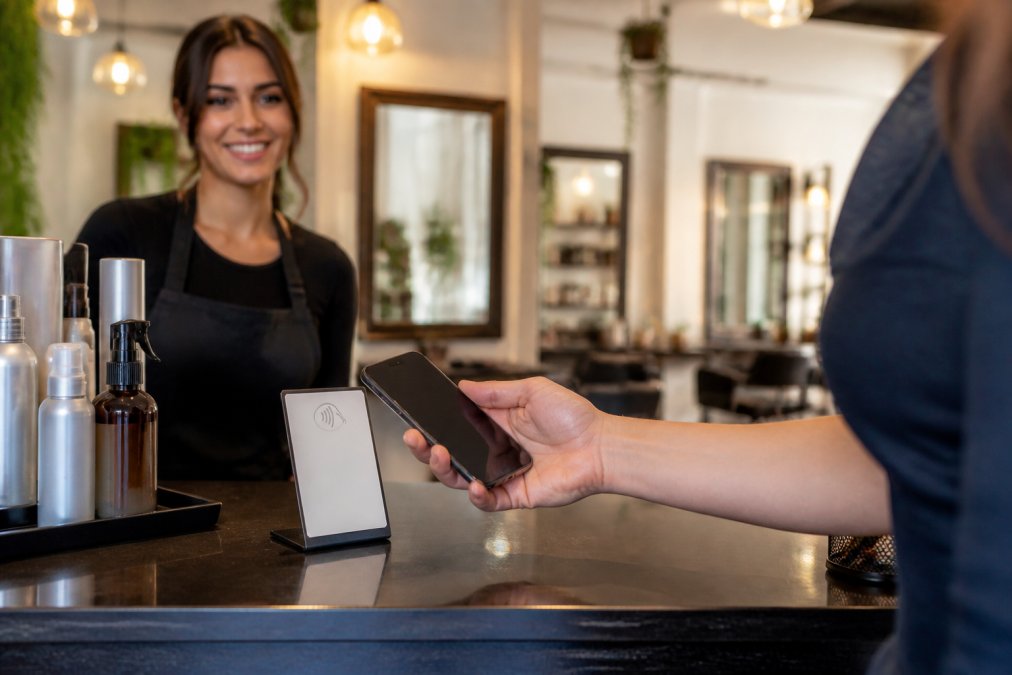
The biggest silent killer of review requests is friction. Typing a business name into Google, scrolling past similarly named competitors, and hunting for the right listing loses most customers before they start. NFC review cards for business solve that by turning the whole process into a single tap.
How a Tap-to-Review Card Works in Practice
A tap-to-review card stores a link to your Google Business Profile. When a customer holds a compatible phone near the card, the phone reads that link and shows a notification. The customer taps the notification, lands on your Google listing, and can leave their own rating and review.
A few practical details worth knowing:
- The customer needs a compatible NFC-enabled phone. Most modern smartphones qualify.
- No separate app is required. The phone's built-in NFC reader handles it.
- An internet connection is needed to load the Google page.
- The card does not write or post anything automatically. The customer writes their own review.
Best Practices for Customer Feedback That Feels Honest
Honest feedback is worth more than a wall of five-star ratings. Customers can smell a scripted review. So can Google. The best practices for customer feedback start with giving people room to say what they actually think, and understanding why they bother to say it at all.
The Psychology Behind Why Customers Leave Reviews
Most review requests fail not because the customer is unhappy, but because the ask triggers no internal reward. Behavioral research on prosocial behavior shows people are more likely to act when they can see the impact of their action. A vague "please leave a review" gives the customer nothing to picture. A specific ask, "your note helps the next person decide if this cut is right for them", gives them a role.
Three psychological levers matter most:
- Reciprocity. When you've just delivered a good experience, the customer feels a small social debt. Asking immediately, while that feeling is active, converts better than asking later.
- Identity. People like to act consistently with how they see themselves. "You've been coming here for two years, would you share what keeps you coming back?" works better than a generic request.
- Low friction + low stakes. The smaller the perceived effort and the more explicit the "no pressure" framing, the higher the completion rate. A tap-to-review card removes the typing; a neutral script removes the guilt.
What Honest Feedback Actually Requires
A few principles hold up across industries:
- Ask everyone, not just the happy ones. Selectively asking only satisfied customers is review gating and violates platform guidelines.
- Keep the ask neutral. "Would you leave a review?" beats "Would you leave us a five-star review?"
- Make it easy to say no. A customer who feels cornered may leave a resentful review instead of none at all.
- Respond to every review. Replies signal that you read feedback and care about the customer experience.
- Never script the sentiment. Give the customer the channel, not the words. Pre-written review text that customers paste verbatim is easy for Google to flag and easy for future customers to distrust.
The FTC guidance on endorsements and reviews is clear that reviews should reflect genuine customer experience, not a curated highlight reel. That's not just a legal point. Authentic testimonials carry more weight with future customers than a suspiciously perfect rating history.
Turning the Ask Into a Habit, Not a Campaign
The businesses that collect the most honest reviews don't run review campaigns. They build the ask into the routine: at checkout, on the receipt, in the follow-up text. When the ask is predictable, customers stop treating it as a favor and start treating it as part of the transaction, which is exactly when they're most likely to leave a real review.
Tapnivo NFC Google Review Card – Tap →
Handling Negative Feedback Without Losing the Review
Here's a service recovery approach that works:
- Respond within 24 to 48 hours. Fast replies signal that you're paying attention.
- Thank the customer for the feedback. Even when it's harsh.
- Acknowledge the specific issue. Vague apologies read as copy-paste.
- Take the conversation offline. Offer a phone number or email to resolve it directly.
- Follow up once resolved. A brief note that the issue was fixed closes the loop.
Never argue in the review thread. Never blame the customer publicly. The audience for your reply is not the reviewer. It's the next person deciding whether to walk through your door.
Automated vs. Manual Review Requests: What Works for Small Teams
Small teams don't have the bandwidth for a dedicated review-collection process. That's the honest reality. So the question becomes: automate the ask, or keep it manual? The answer depends less on team size than on where your customer data already lives.
Manual Asks: When the Personal Touch Wins
Manual asks work well when the interaction is personal and the volume is manageable. A barber who knows every customer by name can ask naturally at the chair. That personal touch is hard to automate, and it often produces the most detailed reviews because the customer feels a real relationship.
Automated Workflows: Triggers, Timing, and Tools
Automated follow-ups work better when volume is higher or when staff turnover makes consistency hard. A text or email triggered after a purchase ensures the ask happens every time, not just when someone remembers.
- Point-of-sale (POS) platforms. Many POS systems can attach a review link to a digital receipt or trigger a follow-up text after a transaction closes. This is the lowest-lift option because the customer data is already there.
- Email marketing platforms. Tools like Mailchimp or Constant Contact can send a review request as part of a post-purchase sequence. The catch is that these platforms usually need the customer's email, which means the ask only reaches people who opted in.
- CRM and scheduling software. Appointment-based businesses (salons, dental offices, auto shops) often get the best results here. A CRM can trigger a review request a set number of hours after an appointment is marked complete, which lines up with the 24-to-48-hour window that works best for larger purchases.
A few practical rules for automated asks:
- Trigger on a completed transaction, not a scheduled one. A no-show or a canceled appointment shouldn't generate a review request.
- Send once. A single follow-up outperforms a three-email sequence. Repeated asks read as pressure and can hurt your sender reputation.
- Include the direct review link. An automated ask that makes the customer search for your listing defeats the purpose of automating it.
- Keep the copy neutral. The same rules that apply to in-person asks apply to automated ones, no incentives, no rating instructions, no review gating.
The Hybrid Setup Most Small Teams Land On
For most small businesses, the strongest setup is a hybrid: a manual, in-person ask at the counter using a tap-to-review card, backed by an automated follow-up for customers who don't act on the spot. The card handles the friction. The follow-up handles the forgetful.
Frequently Asked Questions
How do I politely ask a customer for a review without sounding pushy?
Keep it short and tie the request to their experience. After a service, try: "If you enjoyed your visit today, a quick Google review would mean a lot to our team." Hand them an NFC review card or stand so they can tap and go. The key is to ask once, make it optional, and never pressure them for a five-star rating. Honest feedback, even mixed, builds more trust than a wall of perfect scores.
When is the best time to ask a customer for a review?
Right after the service or purchase, while the experience is still fresh. For a barbershop or salon, that is at the chair or checkout counter. For a restaurant, it is when the check is dropped. For auto detailing, it is at vehicle pickup. If you miss that window, a follow-up within 24 hours works second best. NFC review cards make the in-person ask easy because the customer taps and the review page opens immediately.
What are the best templates for requesting customer feedback?
Short and specific beats long and formal. In person: "Would you mind sharing your experience on Google? It helps other locals find us." By text: "Thanks for visiting [Business] today! If you have a minute, a Google review would help us a lot: [link]." By email: "We'd love your honest feedback. Tap here to leave a review." Pair any template with an NFC review card so the customer does not have to type a link.
How can NFC technology simplify the review process for customers?
NFC review cards for business let a customer hold a compatible phone near the card, tap the link notification that appears, and open your Google review page. No typing a business name, no searching through similar listings, no app download. Tapnivo's NFC Google Review Card (https://tapnivo.co/products/nfc-google-review-cards) is a one-time purchase with no monthly fees. It works with compatible NFC-enabled phones and stays reusable at your counter or front desk.
How do you handle negative feedback while still encouraging positive reviews?
Respond to negative reviews calmly and publicly. Thank the customer, acknowledge the issue, and offer a way to make it right offline. Do not argue or offer incentives to change the rating, since that violates Google's review policies. Then keep asking happy customers for honest reviews using the same simple method. A mix of reviews with thoughtful owner responses often reads as more trustworthy than an unbroken run of five-star ratings.
Is it against Google's rules to ask customers for reviews?
No. Google allows businesses to ask customers for reviews, but it prohibits fake reviews, review gating (only asking happy customers), and incentives like discounts or free items in exchange for a rating. Ask everyone, keep the request neutral, and never write reviews on a customer's behalf. A tap-to-review card simply opens your listing; the customer chooses their own rating and writes their own words.