
Table of Contents
- What NFC Cards Are and How They Work for Reviews
- NFC Review Cards vs QR Codes: Which Works Better
- How to Set Up an NFC Review Card for Your Business
- Google Review Request Scripts That Actually Work
- Best Review Management Tools for Small Businesses
- Common Mistakes to Avoid When Collecting Reviews
- Frequently Asked Questions
Last Updated: October 9, 2026
What NFC Cards Are and How They Work for Reviews
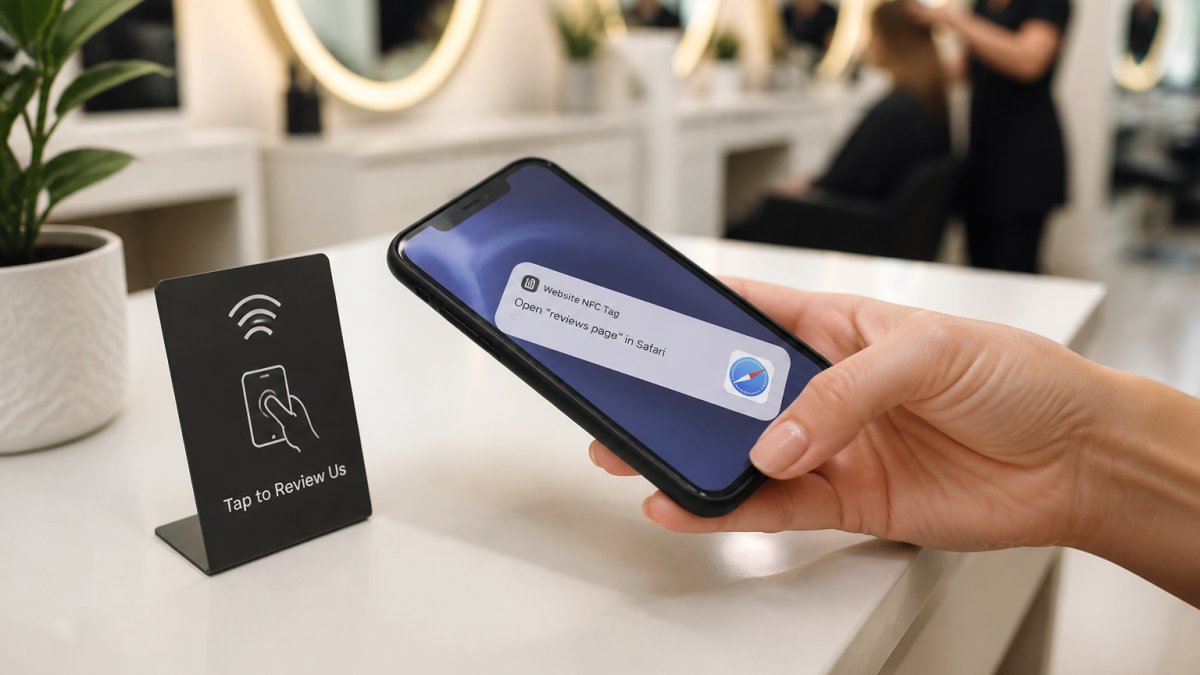
Near-field communication, or NFC, is a wireless technology that lets smartphones read data from a card held close to them. For gathering customer reviews, NFC cards for gathering customer reviews store a link to your Google Business Profile. When a customer taps their compatible phone on the card, a notification pops up with your review link, and your Google review page opens instantly.

The process eliminates friction: no typing your business name into search, no hunting through similar listings. They just tap and review.
How a tap opens your Google review page
When a customer holds an NFC-enabled phone near an NFC card, the phone's built-in reader detects the card and displays a link notification automatically, with no app download required. The customer taps it, their browser opens, and they land on your Google Business Profile ready to leave a rating and written review.
The whole interaction takes seconds, and that speed matters because customer sentiment is freshest right after the experience. A salon customer who just finished a great haircut is more likely to leave a review then than later at home.
Why one-tap review collection reduces friction
Most review requests fail because they ask too much. "Search for us on Google, find our listing, click the review button, write something nice" is four steps, and most people quit after step one.
NFC cards for gathering customer reviews reduce that to one action: tap. You're meeting customers where they are with a physical object they can use immediately.
This matters especially for service businesses. A barbershop customer has their hands full after a haircut, and a restaurant guest leaving dinner is thinking about getting home. An NFC card on the counter removes barriers at the moment they're most likely to comply.
NFC Review Cards vs QR Codes: Which Works Better
Both NFC cards and QR codes send customers to your Google Business Profile review page. The difference is how they get there, and that shapes who actually completes the review.
Here's how each option works in practice, plus the formats most businesses overlook.
How each option actually works
NFC card or stand. The customer holds a phone near the card, the NFC reader shows a link notification, and tapping it opens your review page.
QR code. The customer opens their camera, points it at the code, waits for the link preview, then taps it. Some phones need a dedicated scanner app.
Printed short URL. The customer types a short address like yourbusiness.com/review into their browser. It works on any phone, but typing is the highest-friction option.
Digital link (text, email, receipt). You send the link after the visit.
A neutral comparison
| Format | What the customer does | Phone requirement | Works if NFC is off | Best fit |
|---|---|---|---|---|
| NFC card or stand | Holds phone near card, taps notification | NFC-enabled phone | No | Counter, register, reception desk |
| QR code | Opens camera, scans, taps link | Any smartphone with a camera | Yes | Windows, menus, receipts, outdoor signage |
| Printed short URL | Types the address | Any phone | Yes | Newsletters, packaging, invoices |
| Digital link | Taps a link in a message | Any phone | Yes | Follow-up emails, SMS, receipts |
The trade-offs that matter
Reach vs. friction. QR codes and short URLs work on every phone. NFC cards only work on NFC-enabled devices with NFC turned on.
Perception. A physical NFC card or stand reads as intentional, signaling that you thought about the customer's experience. A printed QR code taped to a counter can read as an afterthought.
Editing and flexibility. QR codes are static once printed unless you use a dynamic QR service with a redirect URL you control. If your review link may change, choose a format you can update.
Durability.
Which should you choose?
If customers check out at a counter or reception desk and most carry modern phones, an NFC card or stand removes the most friction. If you serve customers in a waiting area, at a table, or outdoors, a QR code reaches everyone. For most small businesses, the answer is both: an NFC card for the tap-ready majority and a QR code as the fallback.
How to Set Up an NFC Review Card for Your Business
Setting up an NFC review card takes minimal effort. You need your Google Business Profile link and a compatible NFC card.
Step 1: Choose your card and provide your Google Business Profile link
Start by getting your Google Business Profile link: log in, click "Share," and copy the link. This is what the NFC card will direct customers to.
Then choose your NFC card format. Tapnivo offers NFC Google review cards designed for this purpose. You provide your Google Business Profile link at checkout, and the card arrives pre-programmed, so there's no technical setup on your end.
Step 2: Position the card at your point of service
Place your NFC card where customers naturally pause during checkout or as they leave: the reception desk at a salon, the host stand or exit at a restaurant, the checkout counter at a retail shop. The goal is visibility and easy access.
Keep the card in good condition.
Step 3: Train your team on the tap-to-review process
Your team should know how to explain the card simply: "We'd love your feedback on Google. Just tap your phone here, and it'll open our review page."
That's it. Most customers understand instantly. Your team's job is to make the offer feel natural and optional, not pushy.
Tapnivo NFC Google Review Card – Tap Your Phone to Leave a Review →
Google Review Request Scripts That Actually Work
Asking for reviews works best when it feels genuine and well-timed.
Right after a positive experience: "We really appreciate your business.
For repeat customers: "You've been coming here for a while, and we're grateful. Would you mind sharing your experience on Google?
When a customer compliments your work: "I'm so glad you're happy with [service].
For team members to use during checkout: "Before you go, would you mind leaving us a quick review on Google? Just tap here."
The common thread: acknowledge the customer, explain why reviews matter, and make the action easy. Natural language beats a rehearsed script.
Best Review Management Tools for Small Businesses
Collecting reviews is only half the job. You also need to see them, respond to them, and know whether your request method is working, the part most small businesses guess at instead of measure.
What Google Business Profile already gives you
Your Google Business Profile includes free review management: read every review, reply publicly, get notifications for new ones, and flag reviews that violate Google's policies. For a single-location business, this covers the basics without add-on software.
What paid tools add
Paid review platforms typically add multi-location dashboards, automated request sequences, and sentiment or trend reporting. For one location checked weekly, those features usually aren't worth the complexity; for several locations or long-term trend tracking, they can save time.
How to measure whether your NFC cards are working
You can't directly prove a tap caused a review, because Google doesn't say where a review came from. What you can do is track the steps you control:
- Review volume over time. Note your review count monthly. A steady rise after placing the card is a signal, not proof.
- Ask customers. A simple "Did you use the card?" at checkout gives a rough sense of how many people notice it.
- Watch for spikes. If you place the card on a Friday and see three new reviews by Monday, that's a pattern worth repeating.
Be honest about what this tells you. Correlation isn't causation, a busy weekend, seasonal rush, or viral post can all move your review count. The goal is to spot trends you can act on, not claim precise attribution.
Privacy and data handling
A common question is what an NFC tap collects. The short answer: the tap itself doesn't send customer data to you. The card stores a link, the phone reads and opens it, and your business doesn't receive the customer's name, phone number, or contact details.
What the destination page collects depends on the destination. Google's review page handles the customer's account and review content under Google's own privacy terms.
Accessibility and fallback options
Not every customer can tap: some phones don't support NFC, some have it turned off, and some prefer not to use it. A printed QR code or short URL on the same stand covers those cases. It's the difference between reaching every customer and only the ones with the right phone settings.
Common Mistakes to Avoid When Collecting Reviews
Asking only happy customers. This biases your profile toward five-star reviews and doesn't reflect the full experience.
Ignoring negative reviews. Respond professionally and helpfully to critical reviews: explain what happened, what you're doing to fix it, and invite the customer back.
Asking for reviews in the wrong moment. Don't ask while a customer is frustrated or rushed.
Offering incentives for positive reviews. Google's policies prohibit payment, discounts, or rewards in exchange for reviews.
Treating NFC cards as a one-time setup. Your card only works if customers see it and know how to use it.
Collecting honest Google reviews builds trust with potential customers and improves your local search visibility. Place the card at your point of service, train your team to mention it, and let the reviews flow in. Shop cards at Tapnivo and start collecting feedback today.
Frequently Asked Questions
Do customers need to download an app to use an NFC review card?
No. NFC review cards work with your phone's built-in NFC reader, no separate app required. When a customer holds their compatible smartphone near the card, the phone detects the link and displays a notification. They tap the notification to open your Google Business Profile and leave a review. This simplicity is one reason NFC cards reduce friction compared to asking customers to manually search for your business.
Can I read an NFC review card with any smartphone?
Most modern smartphones have NFC capability, but not all. iPhones (iPhone 7 and later) and most Android phones support NFC. Older devices or budget models may not have the feature. If a customer's phone doesn't support NFC, they can still leave a review by searching for your business manually or using a QR code as a backup option on your card.
How long does it take from a tap to a review appearing on Google?
The tap itself is instant, the customer's phone opens your Google review page immediately. However, Google may take 24 to 48 hours to publish the review after the customer submits it. This delay is Google's standard moderation process, not a limitation of the NFC card. Customers can submit their review right after tapping, while their experience is still fresh.
What makes NFC cards better than other review collection methods?
NFC cards eliminate multiple friction points: customers don't have to remember your business name, type a long URL, or search through similar businesses. The tap-to-review process takes seconds and works at the moment of interaction, when the customer experience is still top of mind. Unlike review stands or printed links, NFC cards are reusable and professional.