
Table of Contents
- Why Getting More Google Reviews Matters
- How to Create a Google Review Link for Your Business
- Best Practices for Google Reviews and Review Solicitation
- Using NFC Google Review Cards to Boost Requests
- Google Review Request Templates That Work
- Automating Review Requests and Managing Responses
- Responding to Reviews and Building Customer Loyalty
- Frequently Asked Questions
Last Updated: September 20, 2026
Why Getting More Google Reviews Matters
A strong collection of Google reviews builds trust with potential customers and improves your visibility in search results, which is why learning how to get more google reviews is essential for your business. But here's what most business owners miss: the reviews themselves are less important than the act of asking for them. Without a clear way to ask, most satisfied customers simply leave. Getting more Google reviews requires removing every barrier between the moment they're happy and the moment they submit feedback.
How to Create a Google Review Link for Your Business
To create a Google review link, open your Google Business Profile, click "Share" near your business name, select "Get link to review page," and copy the link. This link bypasses the need for customers to search for your business, they tap it and land directly on your review page. Use it for email, text messages, printed materials, and review cards.

Best Practices for Google Reviews and Review Solicitation
The timing of your review request matters most. Ask when the customer experience is still fresh, at checkout for a salon, after the meal for a restaurant, when picking up an order for a service business.
Ask at the Right Moment
Make the ask feel natural: "We'd love to hear about your experience, it helps us serve you better next time." Avoid asking days later via email, in-person requests convert at much higher rates.
Make the Ask Easy and Frictionless
Every extra step, typing a URL, searching for your business, navigating menus, costs you responses, which is why the easiest way to get more google reviews is to eliminate friction entirely. Your goal is to get customers from "I'll leave a review" to actually leaving one in under 30 seconds. Frictionless requests also capture honest feedback from satisfied customers, not just the very happy or very upset.
Understand Google's Review Policies and Compliance Requirements
Google has strict rules about how you can solicit reviews. Understanding these rules protects your business from account suspension or review removal.
What you can do:
- Ask customers directly for honest feedback, in person or via email
- Provide a direct link to your review page (like a Google review link or NFC card)
- Respond professionally to all reviews, positive and negative
- Thank customers who leave reviews
- Ask for reviews from customers who had a genuine experience with your business
What you cannot do:

- Offer incentives (discounts, free products, entry into drawings, or cash) in exchange for reviews
- Require customers to leave a review as a condition of purchase or service
- Ask customers to leave only positive reviews or to avoid negative ones
- Use review gating, filtering customers and only asking satisfied ones to review while directing unhappy customers elsewhere
- Compensate employees for leaving reviews or asking friends and family to leave fake reviews
- Manipulate review content or ask reviewers to change what they wrote
A review gate, asking "How was your experience?" and only sending happy customers to review, violates Google's policies and can result in penalties. Incentivizing reviews (even small ones like raffle entries) is equally risky. The safest approach: ask all customers for honest feedback, make the request easy, and let reviews reflect your actual performance.
Using NFC Google Review Cards to Boost Requests
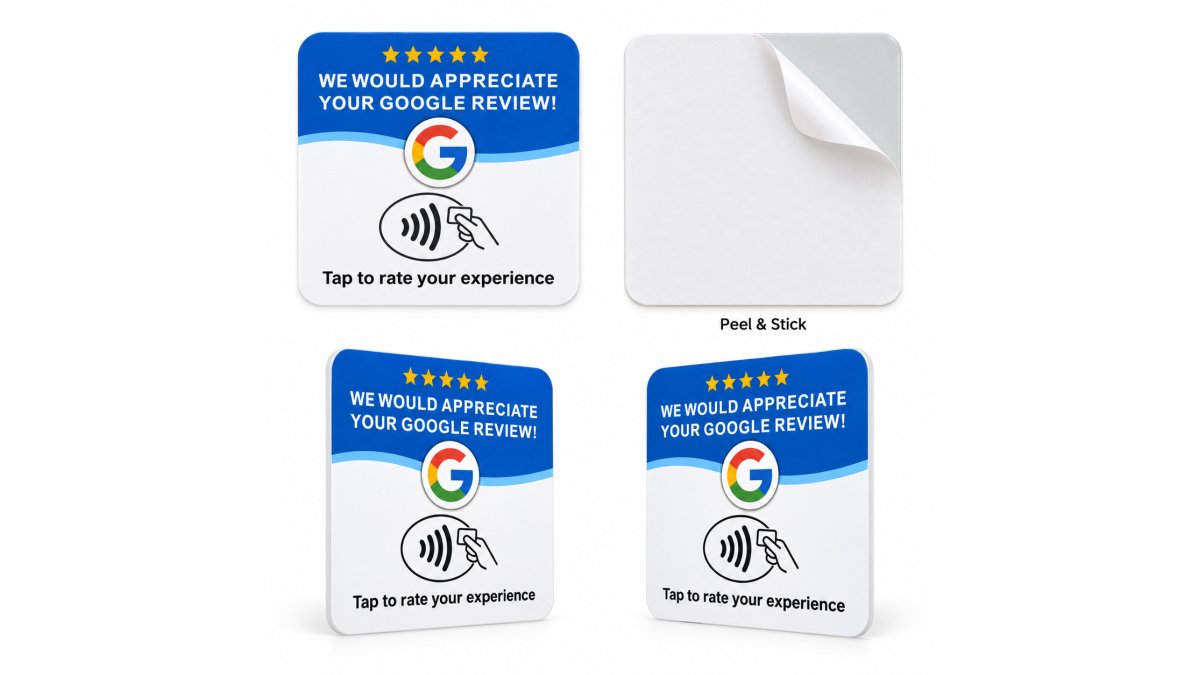
An NFC Google review card is a physical card embedded with a tap-activated link to your Google review page. Customers hold their compatible smartphone near the card, and it opens your review page instantly. No app download, no typing, no searching.
Google Review Request Templates That Work
Templates help you stay consistent and professional. But the best template is one that sounds like you, not like a marketing email.
In-Person Review Requests
For in-person asks, keep it short: "We'd love your feedback on Google. It only takes a minute, and it really helps us." For repeat customers, personalize it: "Sarah, thanks for coming in again. If you're happy with your cut today, we'd really appreciate a Google review. Just tap this card." The key is making it optional and easy.
Email and SMS Review Requests
Email works best within a day or two of the interaction. For email: "Thanks for visiting us on [date]. If you had a great experience, we'd really appreciate a quick Google review. [Link]" SMS converts faster because it's more immediate: "Thanks for visiting us! We'd love a quick Google review if you had a good experience. [Link]" Use SMS only for customers who've opted in.
Automating Review Requests and Managing Responses
Automation saves time, but it only works if you're asking the right people at the right time. The best automation combines timing with a human touch and strict adherence to Google's policies.
How Automation Works for Review Requests
Automation means setting up a system that sends review requests without manual effort. For appointment-based businesses, send requests 24 to 48 hours after completion. For e-commerce, send 3 to 5 days after purchase. For walk-in businesses, in-person asks at checkout or with physical review cards outperform automated email. Most appointment software integrates with email or SMS platforms for templated requests.
Avoiding Review Gating While Automating
"We'd love your feedback on Google. Your honest review helps us improve and helps other customers make informed decisions."
Setting Up Automation Without Extra Tools
If you use Google Business Profile directly, you can manually send review requests through the "Customers" tab, but this isn't truly automated. For real automation, you'll need a third-party tool:
- Email platforms (Mailchimp, Constant Contact, ConvertKit): Set up a workflow that sends a templated email to customers after a set number of days. You control the timing and message.
- SMS platforms (Twilio, SimpleTexting): Send text-based review requests. SMS converts faster than email because it's more immediate and personal.
- Appointment software integrations: Most modern booking systems (Square, Acuity, Mindbody) have built-in review request features or integrate with email/SMS platforms.
- Review management software (Birdeye, Trustpilot, Podium): These platforms automate review requests across multiple review sites, including Google. They also track which customers have reviewed and which haven't, so you don't ask twice.
Tracking and Following Up
Automation only works if you track results. Keep a simple record of which customers have left reviews and which haven't. This prevents you from asking the same person twice, a frustrating experience that damages trust.
Managing and Responding to Reviews at Scale
As your review volume grows, responding to every review becomes time-consuming. Establish a system:
- Set a daily or weekly review check: Log into your Google Business Profile at least twice a week to see new reviews.
- Respond to all reviews, but keep responses brief: A thank-you for positive reviews and a professional acknowledgment for negative ones. You don't need paragraphs, a sentence or two is enough.
- Prioritize negative reviews: Respond to these first and fastest. Potential customers notice when negative reviews go unanswered. A quick, professional response shows you care about feedback.
- Use templates for consistency: Create 3-4 standard responses you can personalize slightly. This saves time while keeping your tone professional.
- Assign responsibility: If you have staff, assign one person to manage reviews weekly. Make it part of their job description.
Responding to Reviews and Building Customer Loyalty
For positive reviews, a simple thank-you works:
"Thanks so much for the kind words! We look forward to seeing you again."
"We're sorry you had that experience. We'd love to make it right. Please reach out to us at [phone/email] so we can talk."
Frequently Asked Questions
What is the best way to ask for a Google review without annoying customers?
Ask immediately after a positive experience when the customer is still satisfied. Keep the request brief and explain why reviews matter to your business. Use a simple call to action like 'We'd love your feedback on Google' rather than a lengthy pitch. NFC cards or direct links remove friction by eliminating the need for customers to search for your business or type a URL.
How do NFC Google review cards work and do customers need an app?
NFC cards use tap-to-open technology. Customers simply tap their NFC-enabled smartphone on the card, and it opens your Google Business Profile review page directly, no app download required. The card works with most modern smartphones that have NFC capability enabled. Customers then choose their own rating and submit their review through Google's standard interface.
How long does it take for a Google review to appear after a customer submits it?
Google typically displays reviews within 24 to 48 hours, though some may appear sooner or take slightly longer depending on Google's moderation process. Timing varies based on review content and whether Google flags it for verification. Asking for reviews while the customer experience is fresh increases the likelihood they'll complete the review before they forget.
Is it legal to incentivize customers to leave Google reviews?
Google's review policy prohibits incentivizing reviews in exchange for money, discounts, or free products. You can ask for honest feedback and make the process easy, but the review itself must be voluntary and unpaid. Offering a discount for any review, positive or negative, violates Google's terms. Focus instead on removing friction and asking at the right moment in the customer journey.
Getting more Google reviews starts with removing friction from the asking process. The easier you make it for satisfied customers to leave feedback, the more reviews you'll get. Physical tools like NFC review cards, clear request templates, and consistent follow-up create a system that works without constant effort. Start with one channel, in-person asks with an NFC card or a simple email template, and measure what works. Then scale from there.