
Table of Contents
- What NFC Review Cards Are and Why Customers Actually Tap Them
- How to Ask Customers for Reviews Without Making It Awkward
- Google Review Request Templates You Can Say Out Loud
- NFC Review Stand Placement Tips for Counters and Checkouts
- The Psychology of the Tap: Small Nudges That Raise Scan Rates
- Troubleshooting: When a Customer's Phone Won't Read the Card
- Tracking Scans and Turning Taps Into Repeat Reviews
- Frequently Asked Questions
Last Updated: October 2, 2026
What NFC Review Cards Are and Why Customers Actually Tap Them
An NFC review card is a physical card that holds a link to your Google Business Profile, and a customer opens that link by holding a compatible phone near the card. No app download, no typing, no searching for your business name. This guide from Tapnivo breaks down how to encourage customers to scan NFC cards at the exact moment they're happiest with your service.

The whole appeal comes down to one thing: removing steps.
The one-second difference between a tap and a typed link
Think about what you're really asking for when you request a review. You want a customer to find your listing, open it, sign in, pick a rating, and write something. That's a lot of small hurdles stacked together.
A tap collapses most of them into a single motion. The phone reads the card, shows a link notification, and the customer taps it. Google's own guidance on how Google reviews work confirms reviewers must sign in to their Google account before posting, so the faster you get them to the listing, the less time they have to lose interest.
Here's the part most owners miss: the card doesn't create the goodwill. It only captures goodwill that already exists. Your job is to build the moment, then hand over the card.
How to Ask Customers for Reviews Without Making It Awkward
The best ask is short, specific, and comes right after you've delivered something good. Vague requests like "if you get a chance, maybe leave us a review" almost never convert.
A common mistake is asking at the wrong point in the visit. Ask while the customer is still standing in front of you, receipt in hand, feeling good about the result.
Try this structure:
- Name the thing you just did for them
- Say the ask plainly
- Slide the card forward
- Stop talking
That last step matters more than people think. Nervous owners over-explain, and over-explaining turns a friendly request into a sales pitch.
Timing the ask to the peak of the visit
Every business has a peak moment. Find yours and build the ask around it.
| Business Type | Peak Moment | Why It Works |
|---|---|---|
| Barbershop | Mirror reveal at the end | Customer sees the finished cut |
| Salon | After the final style check | Satisfaction is at its highest |
| Cafe | When the first sip lands | Immediate, sensory payoff |
| Auto detailer | Walkaround at pickup | The transformation is visible |
| Dentist or chiropractor | After the visit summary | Relief plus clear next steps |
If you ask before that moment, you're interrupting. Ask after it, and you're simply offering a next step.
Google Review Request Templates You Can Say Out Loud
Scripts only work if they sound like you. Pick one, say it a few times, then make it your own.
The straightforward version:
"Thanks for coming in today. If you have ten seconds, tap your phone on this card and it'll take you straight to our Google page. It really helps us out."
The friendly version:
"Glad you're happy with it. If you want to help us out, just tap your phone here and leave a quick note about your visit. No searching, no typing our name."
The low-pressure version:
"No pressure at all, but if you had a good experience, tapping this card takes you right to where you can leave a review."
The regular-customer version:
Tapnivo NFC Google Review Card – Tap →
"You've been in a few times now. If you've got a second, tap here and let other people know what to expect."
Notice none of these promise anything in return. Offering discounts or free items for reviews runs into FTC rules on endorsements and reviews, which require reviews to reflect honest opinions. Keep the ask clean and let the experience do the persuading.
NFC Review Stand Placement Tips for Counters and Checkouts
Put the stand where the transaction ends, not where the customer waits. Checkout counters, reception desks, and pickup windows beat waiting areas every time. The reason is simple: the customer is already stopped, already facing you, and already holding their phone or wallet.
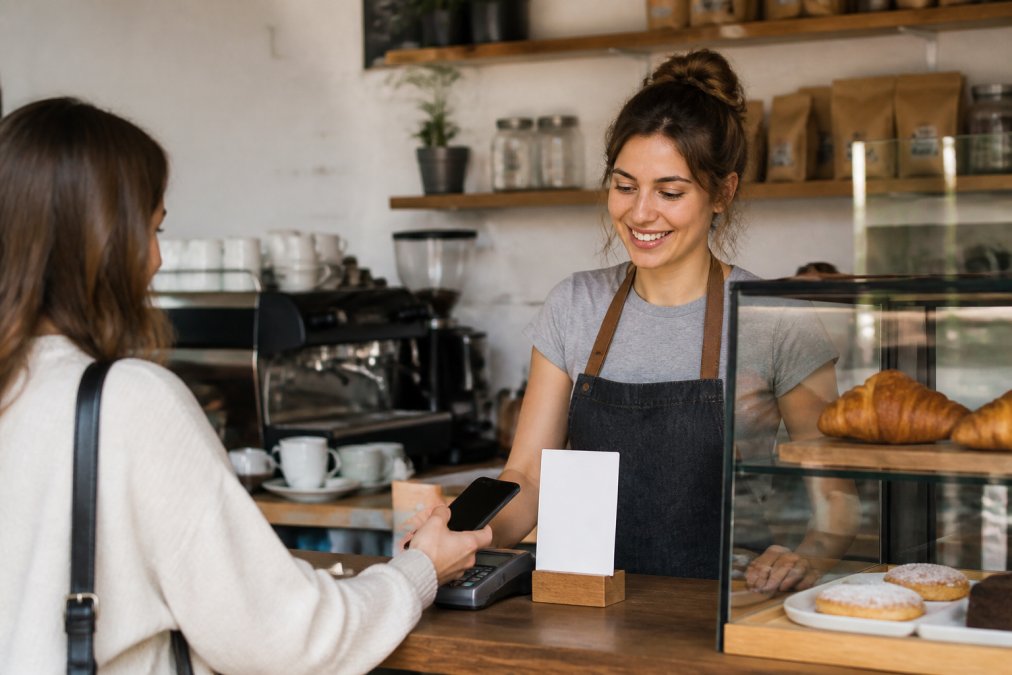
Height matters too. A stand at chest level gets noticed. One flat on the counter gets buried under receipts and tip jars. A good rule of thumb: the top of the card should sit between 4 and 6 inches above the counter surface, angled slightly toward the customer rather than straight up.
Signage and lighting that pull the eye to the stand
A small sign above the stand does more work than the stand itself. Keep the wording to five words or fewer: "Tap to leave a review." That's it. Longer copy gets skimmed and ignored.
The sign should do three jobs at once: signal that a tap is possible, signal that it's easy, and signal that it's welcome. A short line plus a small phone icon covers all three without a paragraph of explanation.
- Place the stand on the customer's side of the counter, not yours
- Keep it clear of card readers, so taps don't get confused
- Add a small light or bright color if your counter is dim
- Move it if staff keep stacking things on top of it
- Angle the card face toward the customer, not the ceiling
A simple placement test you can run this week
Most owners guess at placement and never check. A better approach is to test two spots for a week each and compare how many new reviews show up on your listing.
- Pick two candidate spots, for example, beside the card reader and beside the pickup window.
- Leave the stand in spot A for seven days and count new reviews.
- Move it to spot B for seven days and count again.
- Keep the winner and stop second-guessing.
This won't give you a perfect scan count, but it will tell you which spot your customers actually notice.
The goal is a stand that looks intentional. If it blends into the clutter, customers will treat it like clutter.
The Psychology of the Tap: Small Nudges That Raise Scan Rates
Scan rates rise when the tap feels effortless, expected, and socially normal. The useful part is knowing which specific triggers move the needle and how to build them into your routine.
Reduce the perceived effort. Say "tap your phone here" rather than "leave us a review." The first sounds like one second of work.
Troubleshooting: When a Customer's Phone Won't Read the Card
Most failed taps come down to three things: NFC is off, the phone is in the wrong spot, or a thick case is in the way.
Walk through this in order:
- Check that NFC is enabled in the phone's settings
- Hold the phone's back near the card and pause for a second
- Try the top edge of the phone if the center doesn't work
- Remove a thick or magnetic case
- Fall back to a QR code or a short link
Tracking Scans and Turning Taps Into Repeat Reviews
You can't measure taps directly, but you can measure what they produce: new reviews appearing on your Google listing over time.
Frequently Asked Questions
Do customers need an app to scan an NFC review card?
No app is required. Most modern iPhones and Android phones read NFC tags using the built-in reader. The customer holds the phone near the card, taps the link notification that appears, and their browser opens your Google review page. They may need to sign in to their Google account before posting, but nothing needs to be downloaded or installed first.
What is the best way to prompt a customer to leave a review?
Ask out loud at the moment the visit ends, while the experience is still fresh, and hand the card over or slide it across the counter. Pair the spoken ask with a simple line like, "If you have a second, tap your phone here and tell us how we did." A specific, low-pressure request works better than a vague one, and having the card physically present removes the follow-up step.
Where should I place my NFC review stand for the most taps?
Put it where the customer's hands and phone already are: next to the card reader, on the reception desk, at the pickup window, or beside the tip jar. Eye level or slightly below works better than a low corner. Keep it clear of metal surfaces and thick phone cases, which can weaken the NFC signal, and make sure the card is visible without a staff member having to point it out.
Are NFC cards compatible with all smartphones?
Most phones released in the last several years include NFC, including current iPhones and most Android models. Older or budget phones may not have it, so keep a QR code or a short link as a backup for those customers. Tapnivo cards work with compatible NFC-enabled phones and do not require a separate app, which keeps the process simple for customers who are not tech-savvy.
Getting customers to tap is really about two things: catching them at their happiest moment and making the next step almost invisible. Tapnivo's NFC review cards are built for exactly that, with no monthly fees, no separate app, and a one-time purchase you can reuse at every checkout. Get started with Tapnivo and give your front desk a simpler way to ask.