
Table of Contents
- Why Paper Review Request Cards Fall Short
- NFC Review Stands for Business: Tap-to-Review Technology
- QR Code Alternatives to Paper Review Request Cards
- Best Practices for Asking for Reviews at the Point of Sale
- Digital Review Request Templates You Can Use Today
- Comparing Digital and Physical Review Request Methods
- How to Set Up a Contactless Review System
- Frequently Asked Questions
Last Updated: September 19, 2026
Why Paper Review Request Cards Fall Short
A paper review request card asks a customer to do too much work at the exact moment they have the least patience: typing a long URL, searching your business name, or scanning a card that has faded or gone missing. This guide from Tapnivo breaks down the practical alternatives to paper review request cards, from NFC tap-to-review stands to QR codes and digital templates.
The core problem is friction. Every extra step between "I had a great experience" and "I left a review" is a step where a happy customer quietly gives up. Paper cards also wear out, and staff forget to hand them out during a rush.
- No way to track whether a card was ever used
- No confirmation the customer actually reached your review page
- Reprinting costs every time your info changes
- Nothing to measure, so nothing to improve
The alternative approach flips this: put a reusable, contactless tool at the point of sale and let the customer act in one motion. Below, we'll cover how each option works and which one fits a small service business.
NFC Review Stands for Business: Tap-to-Review Technology
An NFC review stand is a small countertop device with an embedded chip that opens your Google review page when a compatible phone taps it. NFC technology is the same short-range standard used for tap-to-pay, so most customers already know the gesture.
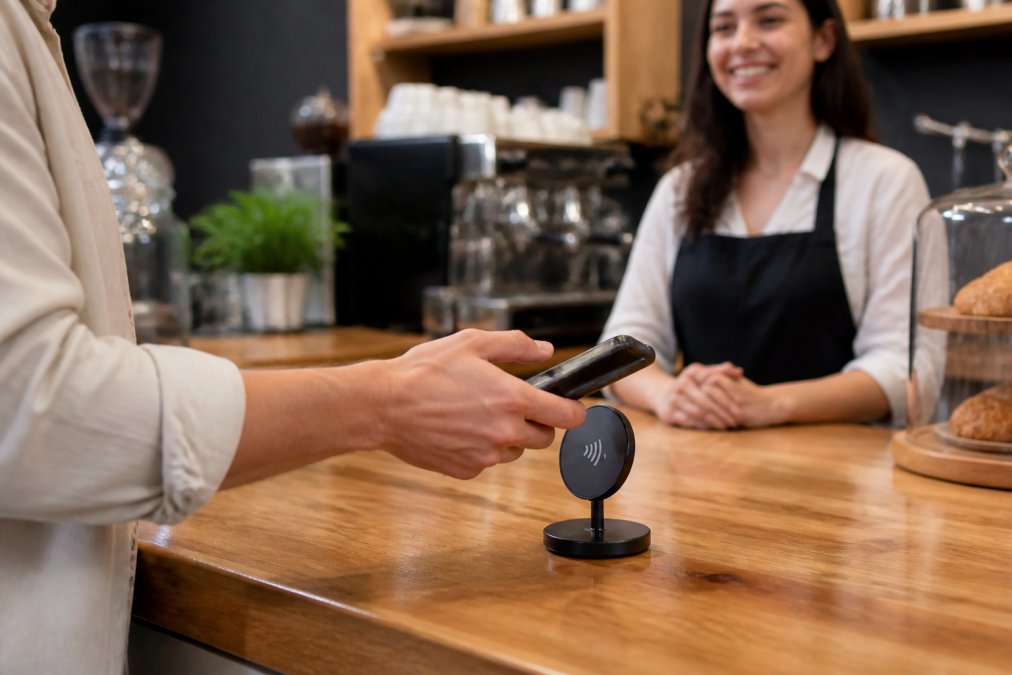
The setup is simple. You program the stand's chip with your review link, place it where customers pay or collect their order, and add a short spoken prompt at checkout. No app download, no pairing, no monthly fee. Tapnivo builds its NFC review stands and cards around exactly this model: a one-time purchase, no subscription, and a tap that opens your Google review page directly.
Two honest limitations. First, the customer's phone must support NFC, which covers most phones from the last several years but not every older device. Second, a tap only works if someone actually taps it, so placement and staff prompting still matter.
QR Code Alternatives to Paper Review Request Cards
A QR code is a printed square that opens your review page when scanned with a phone camera. It is the cheapest alternative to paper cards because you can print it on a receipt, table tent, window decal, or counter sign for almost nothing.
The trade-off is speed.
- Best for: table tents, receipts, and window signage where a tap stand is impractical
- Weakness: slower than NFC, and sensitive to print quality and lighting
- Cost: low upfront, but you reprint every time the code or design changes
Best Practices for Asking for Reviews at the Point of Sale
The tool only works if the ask is timed right. Best practices for asking for reviews come down to three things: ask in person, ask at the peak of satisfaction, and make the action one step.
- Never ask before the service is complete
- Never offer payment or gifts in exchange for a review
- Never pressure a customer who hesitates
- Always give them an easy way to decline
Digital Review Request Templates You Can Use Today
Here is a short counter script you can adapt:
"Thanks so much for coming in today. If you have a second, tapping this stand opens our Google page. It really helps us out."
"Hi [Name], thanks for visiting [Business]. If you enjoyed your visit, a quick Google review would mean a lot. Here's the link: [review link]"
Comparing Digital and Physical Review Request Methods
Choosing between methods comes down to speed, cost, durability, and how much you want to measure. Here is a side-by-side look at the main options.
| Method | Speed | Upfront Cost | Reusable | Trackable | Works Without a Smartphone |
|---|---|---|---|---|---|
| Paper card | Slow | Low | No | No | Yes |
| QR code sign | Medium | Low | Yes | Limited | No |
| NFC tap stand | Fast | One-time | Yes | Limited | No |
| Text/email follow-up | Delayed | Low | Yes | Yes | Yes |
The trade-offs the comparison tables leave out
Privacy. When a customer scans an unfamiliar QR code, they are trusting that the square on your receipt points where it claims to. NFC taps avoid the "what is this code?" hesitation because the phone surfaces the destination URL before opening it, letting the customer see your business name first. If you use QR codes, print the destination domain next to the code.
How to Set Up a Contactless Review System
Setting up a contactless review system takes about 15 minutes and no technical skill. Here is the sequence, plus the two gaps most setup guides skip: what to do when a customer's phone will not cooperate, and how to answer the privacy questions customers are too polite to ask.
- Claim and verify your Google Business Profile so your review page is live.
- Copy your direct review link from your Google Business Profile dashboard.
- Program your NFC stand or card with that link using the provider's instructions.
- Test the tap with two or three different phones before placing it.
- Position the stand at your checkout or pickup counter, in the natural hand path.
- Train staff on a one-sentence ask and where the stand lives.
- Add a QR code to receipts as a backup for customers who prefer to scan.
- Check your Google reviews weekly and respond to each one.
Bridging the offline-to-online gap for non-tech-savvy customers
The hardest customer to convert is the one who had a great experience but does not know how to leave a review. Most setup guides assume the customer already knows what a Google review is and where to find it. In practice, many customers, especially older ones, need a bridge.
Answering the privacy and security questions customers do not ask out loud
Customers hesitate to scan unknown QR codes, and their hesitation is reasonable. QR codes can be swapped or covered with a sticker pointing to a malicious site, and a customer cannot tell by looking (Scammers hide harmful links in QR codes to steal your information). A few habits reduce that friction:
- Print the destination domain directly next to every QR code so customers can see where it leads before scanning.
- Use a QR code that points to your own domain, then redirects to your review page, rather than a raw third-party link.
- Inspect your printed QR codes periodically. A sticker placed over a table tent is a real and documented tactic, so check your signage the way you check your card reader.
- Never ask for a review in exchange for a customer's contact information beyond what you need to send the follow-up, and tell them plainly that the number is only used for that message.
A contactless review system is only as good as its fallbacks. Pair the tap stand with a texted link for customers who will not tap, a printed short URL for customers who will not share a number, and a clear answer for the customer who asks whether the QR code is safe. The businesses that get consistent reviews are the ones that planned for the customer who says no to the first method.
Frequently Asked Questions
How do NFC review stands work for collecting customer feedback?
NFC review stands contain a small chip that communicates with compatible smartphones. When a customer taps their phone on the stand, it opens your Google review page directly in their browser. No app download or typing is required. This reduces friction compared to paper review request cards, where customers must manually type a URL or search for your business. The tap takes about two seconds, making it easy to capture feedback while the customer is still at your counter.
What are the best practices for asking for reviews without being pushy?
Timing matters most. Ask immediately after a positive interaction, whether that is a haircut, a meal, or a repair pickup. Keep the request simple and specific: 'If you enjoyed your visit, would you mind tapping this card to leave a quick Google review?' Train staff to use consistent language. Place NFC review stands or QR codes where customers naturally pause, such as the checkout counter or waiting area. Avoid asking multiple times during one visit, as repetition can feel aggressive.
Are digital review request templates more effective than paper cards?
Digital review request templates offer advantages paper cannot match. They can be customized with your branding, updated instantly, and tracked for engagement. Templates for SMS, email, or printed signage ensure your message stays consistent across every touchpoint. Paper review request cards work once and get thrown away. Digital templates can be reused, A/B tested, and refined based on what actually drives responses. For small businesses, starting with a simple template and adjusting based on customer reactions is the most practical approach.
How do I set up a contactless review system for my salon or restaurant?
Start by claiming your Google Business Profile and confirming your review link. Purchase NFC review stands or cards and program them with your unique review URL. Place them at high-traffic points: the front desk, tables, or near the exit. Train staff to mention the tap option during checkout. Test the cards with your own phone to confirm they work. No monthly fees or apps are needed with Tapnivo cards, making setup a one-time task rather than an ongoing subscription.
Getting customers to leave reviews is a timing problem more than a technology problem. The businesses that build a steady stream of feedback are the ones that remove every extra step between a happy customer and a completed review. Tapnivo makes that easy with reusable NFC review cards and stands that open your Google review page in a single tap, no app download and no monthly fees. Shop Tapnivo cards and stands to put a frictionless review tool on your counter today.